Otherwise
AI agents · OtherwiseTell Sidekick or your own agent to build it
Describe the deal in plain words. The agent drafts it in Otherwise, tries it on carts, and waits for you to switch it on. Tiers, mix and match, conditions, delivery and payment rules, limits at checkout.
Give 3% off when a cart has 3 or more items, and 9% off at 9 or more.
 Sidekick
 Claude
 ChatGPT
 Grok Bot
 Muse
Museit builds the rule
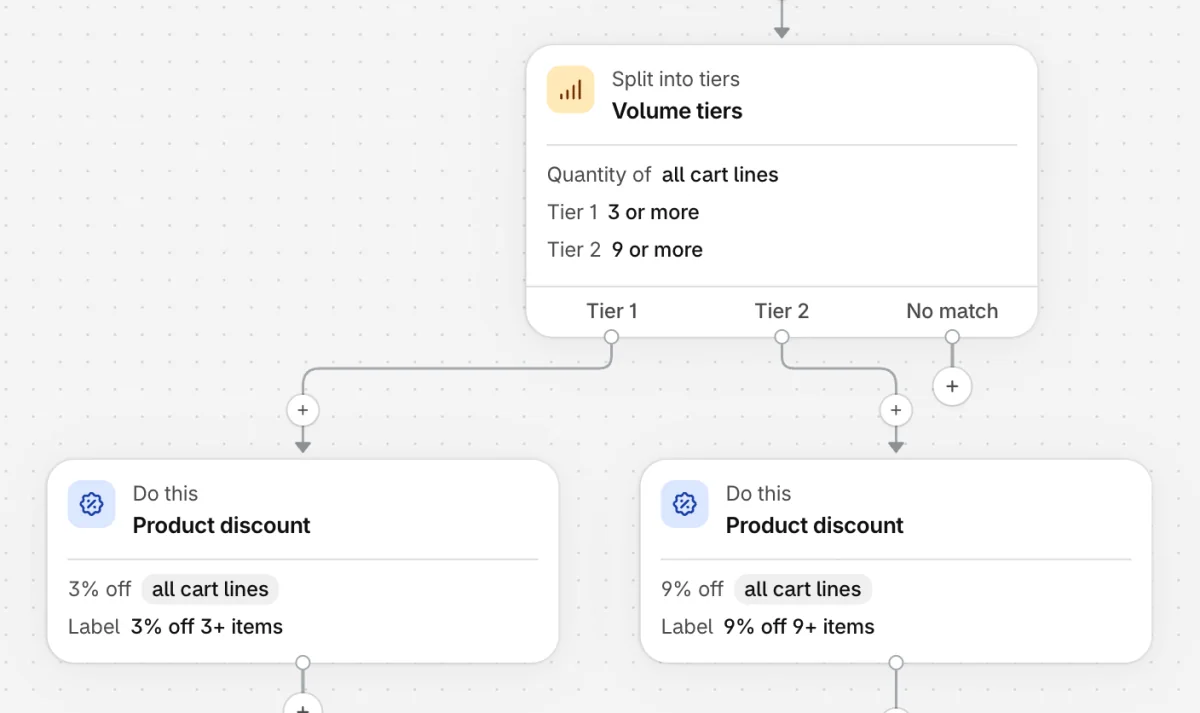
you review it, then switch it on

What to ask for
Things Shopify can't do on its own
Say it the way you'd say it to a person. The agent finds your products and collections, picks a ready-made setup when one fits, and tests the result before it shows you.
You askDiscount Give 3% off when a cart has 3 or more items, and 9% off at 9 or more.
You askDiscount VIPs who spend $150 get a free tote. Other VIPs get 5% off.
You askPayment Don't offer cash on delivery when the order is over $500.
You askCheckout rule Block checkout when the cart has more than 2 from Limited drops.
How to connect
Two minutes, no keys to copy
Sidekick
Install Otherwise, then ask Sidekick in your Shopify admin: "Create a discount with Otherwise: …". It opens the draft in Otherwise for you to check.
Claude or ChatGPT
Open Agents in the app and click the tile. Claude opens its connector form with Otherwise's address filled in; ChatGPT opens a chat with the setup written.
Grok Bot, Muse and others
Click the tile to copy the setup, and paste it to your agent. Any agent that can add an MCP connector works.
Approve it in Shopify
The agent sends you to your admin to sign in. Choose what it may do: read, draft, or publish. You can remove its access on the same page at any time.
It drafts, you approve
A draft never changes checkout. Whatever an agent saves is marked as its work, for you to read, test and switch on.
You set what it may do
Read your rules, also draft new ones, or also publish them. Change it or remove it whenever you like.
Tested before you see it
The agent runs the rule on carts just under and over every threshold, and tells you what each one got.
For agent builders
The details
- MCP server
https://functions.otherwise.run/mcp(streamable HTTP)- Sign-in
- OAuth through the merchant's Shopify admin, with read, draft or publish access. A tool that can't sign in uses a token the merchant makes on the app's Agents page.
- Guide for agents
https://functions.otherwise.run/llms.txt- REST API
https://functions.otherwise.run/api/openapi.json, on the Pro plan
Questions
About agents
Which agents work with Otherwise?
Sidekick in your Shopify admin, and any agent that can add an MCP connector: Claude, ChatGPT, Grok Bot, Muse and others. The Agents page in the app has a tile for each of the four.
Can an agent change my checkout without me?
Only if you allow it. When you connect an agent you choose whether it may read your rules, also draft new ones, or also publish them. A draft never changes checkout, and whatever an agent saves is marked as its work.
How do I stop an agent?
Open Agents in the app and remove its access. It stops at once.
Is it on every plan?
Yes. Agents work on every plan, Free included. A plan only sets how many rules can be live at checkout at the same time.
What can Sidekick do on its own?
On its own, Sidekick makes amount-off and free-shipping discounts. Through Otherwise it can build the rest: tiers, mix and match, conditions, delivery and payment rules, limits and bundles.
Hand it the next promotion
Free to start, with one rule live at checkout. Drafts and tests are unlimited.